
How to Test UV Ink Adhesion Before Production
Have you ever printed a batch of acrylic signs, promotional products, or personalized gifts, only to find that the ink scratches or peels off during handling? Poor ink adhesion can lead to wasted materials, production delays, and customer complaints.
Testing UV ink adhesion before mass production is one of the most effective ways to reduce these risks. By checking the actual substrate, preparing a test print, and evaluating the cured ink film, you can identify potential problems before committing to a full order.
In this guide, Skycolor explains how to test UV ink adhesion, what causes ink to peel, and how to establish a more reliable quality-control process.
What Is UV Ink Adhesion?
UV ink adhesion refers to how well UV-curable ink bonds to a material's surface after exposure to ultraviolet light. Unlike some inks that penetrate into a substrate, UV ink typically forms a cured ink film on the surface.
The strength of this bond depends on several factors, including the substrate's surface properties, its coating, surface cleanliness, ink compatibility, ink layer thickness, and curing conditions.
A print may look sharp and feel dry immediately after printing, but that does not automatically mean it will withstand scratching, handling, or repeated use. Appearance and adhesion should be evaluated separately.
Why Should You Test UV Ink Adhesion Before Production?
| Potential Problem | Impact on Your Business |
|---|---|
| Ink peeling or flaking | Rejected products and reprints |
| Poor scratch resistance | Reduced product quality and customer satisfaction |
| Inconsistent results between material batches | Unpredictable production quality |
| Incompatible surface treatment | Additional preparation costs and production delays |
How to Test UV Ink Adhesion: 5 Practical Steps
Step 1: Identify and Inspect the Substrate
Start by identifying the exact material you intend to print on. Acrylic, glass, aluminum, PVC, wood, and coated plastics have different surface characteristics, so they should not be treated as interchangeable substrates.
Before testing, check the following:
- Material type, supplier, and batch number.
- Whether the surface has a protective film, coating, or other treatment.
- Visible dust, fingerprints, oil, moisture, or manufacturing residue.
- Whether the material supplier recommends a specific cleaning or pretreatment method.
Clean the surface using a method approved for that material. Do not assume that the same cleaning solvent is suitable for every substrate, as some chemicals can damage plastics or existing coatings.
Step 2: Print a Small Test Sample
Use a sample from the actual material batch planned for production. Print a small design that includes solid color areas and, where relevant, white ink or multiple ink layers.
Keep the artwork, ink configuration, print mode, and curing settings consistent with the intended production job. This makes the test more representative of the final product.
If you are comparing surface preparation methods or primers, label each sample clearly and change only one variable at a time.
Step 3: Allow the Print to Cool and Follow the Recommended Evaluation Time
After printing, allow the sample to cool and follow the ink and printer manufacturer's instructions for evaluating adhesion. A print that feels dry to the touch may still require additional time before its final adhesion performance can be assessed.
Record the elapsed time between printing and testing. Use the same waiting period for each sample so that the results can be compared fairly.
Step 4: Perform a Scratch Check and Tape Adhesion Test
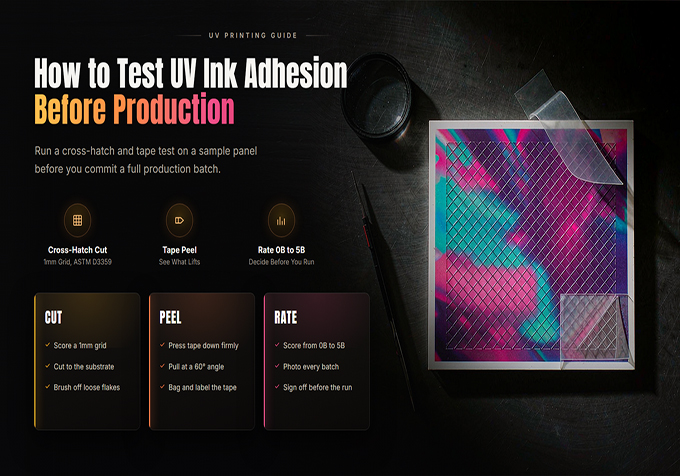
A preliminary scratch check can help identify obvious adhesion problems. For a more structured assessment, a cross-hatch tape test is commonly used to examine whether the cured ink film remains attached to the substrate.
- Prepare the test area: Use a designated sample and the appropriate cross-hatch testing tool or procedure.
- Create a test pattern: Make a controlled grid of cuts through the ink film, following the applicable test method.
- Apply the specified tape: Use the tape type and application procedure required by the selected test method.
- Remove the tape: Follow the method's specified removal technique.
- Inspect the result: Check whether ink has lifted outside the intended cut areas and record the findings.
How should you interpret the result? If the ink remains attached except where it has been deliberately cut, the sample may indicate satisfactory adhesion under that test. If substantial areas of ink lift away, investigate the substrate, surface preparation, ink compatibility, and curing conditions.
For formal quality control, use the applicable standardized test procedure and acceptance criteria. An informal scratch check or tape test alone does not certify long-term durability or suitability for a particular end use.
Step 5: Record the Results Before Approving Production
Once the sample has been evaluated, record the conditions and results. This information makes future troubleshooting easier and helps maintain consistent quality when a material or ink supply changes.
- Substrate name and batch.
- Cleaning and pretreatment method.
- Ink configuration and print settings.
- Time between printing and testing.
- Adhesion test method and result.
- Corrective actions and final approval status.
What Causes Poor UV Ink Adhesion?
| Possible Cause | What to Check |
|---|---|
| Surface contamination | Dust, oil, fingerprints, moisture, and residue |
| Incompatible substrate | Surface chemistry, coating, and ink compatibility |
| Insufficient or unsuitable curing | UV curing system condition and manufacturer-approved settings |
| Excessive ink build-up | Ink layer thickness and multilayer print settings |
| Incorrect pretreatment | Whether a compatible primer or other approved treatment is needed |
How Can You Improve UV Printing Adhesion?
Choose Materials Compatible with Your UV Ink
Material selection is the first step toward reliable adhesion. Even two products made from the same base material may behave differently because of coatings, additives, surface finishes, or manufacturing processes. Test the actual product rather than relying on its material name alone.
Use the Correct Surface Preparation
Keep the substrate clean and dry, and follow the material supplier's recommendations. For difficult surfaces, ask your ink or printer supplier whether a compatible primer or approved surface treatment is appropriate.
Verify UV Curing Conditions
Check the curing system, ink settings, and recommended operating parameters. Do not assume that increasing UV exposure will always improve adhesion. Excessive or insufficient curing, unsuitable ink thickness, and incompatible materials can all affect the final result.
Standardize Your Testing Procedure
Use the same sample preparation, printing conditions, evaluation timing, and acceptance criteria for comparable jobs. When a material batch or consumable changes, repeat the test before returning to full production.
UV Ink Adhesion Test Checklist
Before releasing a new job, use this quick checklist:
- ☐ The exact substrate and batch have been identified.
- ☐ The surface is clean and prepared correctly.
- ☐ A representative test print has been produced.
- ☐ The recommended curing and evaluation conditions have been followed.
- ☐ Adhesion and relevant scratch or handling resistance have been checked.
- ☐ Results have been recorded and the sample approved.
Frequently Asked Questions
1. Why does UV ink peel off after printing?
Common causes include incompatible materials, surface contamination, unsuitable pretreatment, incorrect ink layer thickness, and curing problems. Test the actual substrate and review each process variable before changing multiple settings at once.
2. Does UV ink adhere to all materials?
No. UV printing supports a wide range of substrates, but adhesion depends on the specific ink, surface finish, material formulation, and preparation method. Some surfaces require a compatible primer or pretreatment.
3. Is a scratch test enough to confirm UV ink adhesion?
A scratch test is useful for preliminary screening, but it does not establish every aspect of adhesion or durability. A suitable tape adhesion test and application-specific checks may also be necessary.
4. Can a UV printer's curing settings affect adhesion?
Yes. Curing conditions can affect the ink film's final properties. Follow the printer and ink manufacturer's recommended settings and investigate the curing system if test results are inconsistent.
5. Should I test every new batch of material?
For critical or high-volume production, testing new batches is a sensible quality-control practice, especially when the supplier, surface coating, or material formulation may have changed.
Conclusion
Testing UV ink adhesion before production helps you identify material compatibility issues, reduce avoidable reprints, and build a more consistent printing workflow. The key is to test the actual substrate, use a controlled procedure, follow the recommended curing conditions, and document the results.
If you are evaluating a UV flatbed or roll-to-roll printer for your business, consider your target materials, production requirements, and adhesion testing needs before choosing a solution.
Looking for a UV Printing Solution?
Skycolor provides UV flatbed and roll-to-roll printing solutions for a wide range of printing applications. Contact our team to discuss your materials, sample testing requirements, and production goals.
Email: sale@skycoloruv.com
WhatsApp: +86 177 0063 9356
Website: www.skycoloruv.com


